


LinkedIn is the professional social network where business buyers, decision makers and job seekers spend their time. If you are looking to get more out of the platform — whether for sales, recruitment or personal branding — LinkedIn Premium is the paid upgrade worth knowing about.
It’s got lots of cool features for advertising and organic posting, but for some, the usual LinkedIn platform is not enough. LinkedIn Premium is a service provided by the social media site that opens a lot of new doors for users, recruiters and businesses. It has a whole range of new and improved features set to help you achieve your goals, specific to what you’re on LinkedIn to do.
Who Can LinkedIn Premium Help?
LinkedIn Premium was built for general users, recruiters, job seekers and sales professionals. Therefore, each service is tailored and priced differently. Wordtracker found that although some features exist only under specific accounts, such as featured applicant status for Job Seekers, most features are similar to the general user premium package. Thus, the features can be useful to all LinkedIn users, whether you’re seeking a new career or want to advertise your own business.
What Features of LinkedIn Premium Are Useful to Businesses?
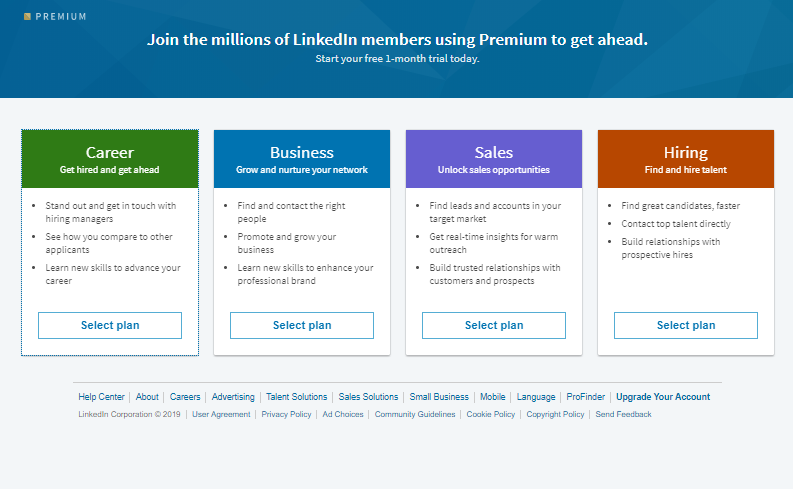
There are two different options for you to pick from the feature – Premium Career and Premium Business. It all depends on what features you want more and what your objectives are in your strategy.
InMail
One of the paid features on LinkedIn, but included in the Premium Career and Business packages, is the InMail tool. This is one of the most basic but most useful features for businesses. InMail allows you to message other users on LinkedIn, without having to connect with them first. You do not even have to be in the same group to send them a message! LinkedIn describe InMail as ‘private messages that allow you to contact anyone on LinkedIn without an introduction or contact information.’ You can send an InMail from either a user’s profile or through search results in LinkedIn Recruiter.
Although this feature may be useful to job seekers wanting to ask questions or request more information about a job and recruiters looking to hire new people for their clients, it’s also greatly beneficial for business owners too. Firstly, you can connect with possible partners through LinkedIn. You can also look for potential LinkedIn influencers to help promote your business through their social channels. Finally, you can look for possible employees that you want to hire too.
For Premium Business users, LinkedIn explains that, ‘InMail is 2.6x more effective than email or cold calls. Connect with a larger network so you can start conversations that matter to your business, sooner.’
See Who’s Viewed Your Profile
That’s right, with LinkedIn Premium you can see whose be perusing over your profile. This means you can see who’s interested in your profile, and potentially your business. It’s incredibly frustrating for normal users that get told people have seen their profiles, but aren’t allowed to access the information.
You can then make connections with new people and get your profile, and your business’s page (if you’ve got it listed in your own profile) noticed. According to LinkedIn’s own description, this feature can help you find connections, grow relationships and help you discover new talent.
AI Features
LinkedIn has added AI tools to Premium in 2024/2025, including: AI-powered writing suggestions for your profile and posts, an AI job coach for Premium Career users, and AI-driven search insights
Insights
LinkedIn Premium gives you access to special metrics because of your ability to see your search appearances and profile views. Although it may not seem like useful information, Make Use Of state, ‘if you’re trying to improve your LinkedIn profile, it’s a great metric for measuring your success.’
LinkedIn Premium Business also gives you company insights that the normal version doesn’t offer. According to LinkedIn, the Premium upgrade ‘gives you an edge over the competition with valuable insights that offer complete access to competitors data, industry news, and analytics’.
Unlimited Browsing Capabilities
No-one was ever put off by the world ‘unlimited’. With Premium, you can find new prospects faster because of the unlimited browsing capabilities the upgrade offers. You can search without being restricted, which means new prospects for your business!
Open Profile
An open profile lets people easily send you a message, even if you aren’t connected. This transparent approach may make more users reach out and make contact with you.
LinkedIn Premium not only lets you have an open profile, which lets people outside of your network connect with you, but also puts a gold badge next to your name in search results. Lots of people go to social media to check legitimacy of a business before buying a product or service or applying there for a job. Therefore, a gold badge is the perfect accessory to have next to your name, as it makes you look active on the platform and shows you’ve invested into your profile. Also, you stand out against others in the search results.
Training
Another fantastic feature of LinkedIn Premium is the number of courses you’ll have access to when you upgrade. There’s a total of 13,000! These courses all feature advice from industry experts in the business, technology and creative fields.
LinkedIn also regularly update their training courses as they analyse what people are searching for and need help with. This means you won’t be stuck watching the same training seminar but will be presented with fresh courses every week.
How to get one month of LinkedIn Premium free
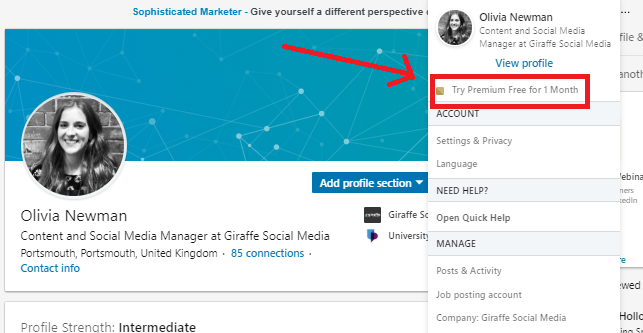
To get a premium account on LinkedIn, you simply have to go to the ‘Me’ icon at the top of your homepage. Next, click ‘Try Premium Free for 1 Month’. You will have to input your card details, but you can cancel one day before the trial ends. This means you won’t end up paying.
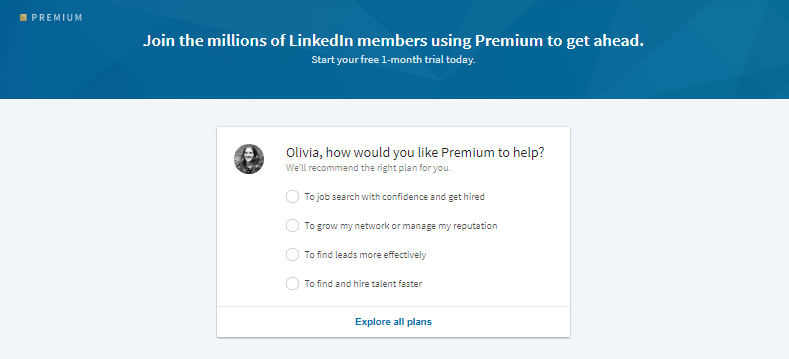
LinkedIn will then take you to another page, which will ask you ‘How would you like Premium to help?’ with options, so they can recommend the right plan for you. Alternatively, you can explore all plans.
How much does LinkedIn Premium cost in the UK?
- Premium Career: approximately £29.99 per month
- Premium Business: approximately £44.99 per month
- Note: Sales Navigator is separate — see our LinkedIn Sales Navigator guide
- All plans available month-to-month or at a discount if billed annually
- LinkedIn typically offers a free one-month trial for new Premium subscribers
Is LinkedIn Premium worth it for businesses?
For most businesses actively using LinkedIn for lead generation or recruitment, the Business plan is worth trying — especially with the free trial. If the goal is purely sales prospecting, Sales Navigator is the better option. If it is mostly brand-building, the free plan may be enough.
Frequently asked questions
How much does LinkedIn Premium cost in the UK?
LinkedIn Premium starts at around £29.99 per month for the Career plan and £44.99 per month for the Business plan. Prices can vary and are best confirmed on LinkedIn’s pricing page. All plans come with a free one-month trial for new subscribers.
What is the difference between LinkedIn Premium and a free account?
The free LinkedIn account lets you connect, post and search, but with limits. LinkedIn Premium adds InMail credits (so you can message people you are not connected to), access to everyone who has viewed your profile in the last 90 days, LinkedIn Learning courses, AI writing tools, and a Premium badge on your profile. The Business tier also adds company insights and unlimited profile browsing.
Can I try LinkedIn Premium for free?
Yes. LinkedIn typically offers a one-month free trial when you sign up for Premium. You will need to add a payment method but you can cancel before the trial ends and you will not be charged.
Is LinkedIn Premium worth it for businesses?
For businesses actively using LinkedIn for lead generation or recruitment, LinkedIn Premium Business is worth trialling. The InMail credits, extended profile view history and company insights add genuine value. If your primary goal is B2B sales prospecting, LinkedIn Sales Navigator is the more powerful option — though more expensive.
Still Considering it?
If you’re still wondering if LinkedIn Premium is for you, LinkedIn will let you try an upgraded, Premium account for a month for free. After thirty days. you can decide whether it’s for you and your business or not. If you need any help with your LinkedIn marketing or advertising, please get in contact today.